I came across some video training to preview for which I did not have an application that will play them back. Stu over at Vinternals suggested VLC media player which is a free piece of software that plays most audio and video formats.
Stu was right as rain. I did not recognize the file extension of the video files, and the file extension was not a registered type that VLC would natively support, however, VLC had no problem detecting the video format and then opening and playing back the file.
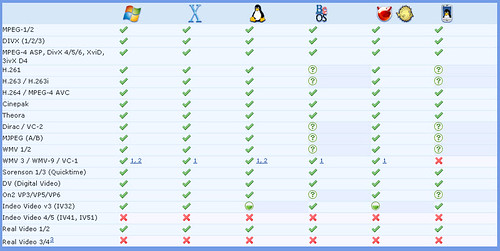
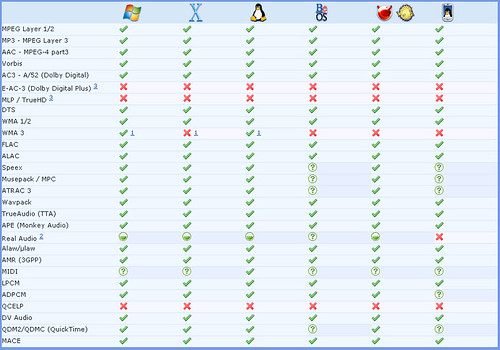
VLC provides the following charts showing their support for the various formats and platforms:













Hi Jason,
I’ve ‘migrated’ to VLC a time ago also. I got upset with all this codecs needed to play this, or that. VLC does this like a charm. Without any aditionals codecs needed…. It plays everything…
Hi Jason, you can also stream from it over IP, which is pretty handy..if you need it i guess.
J
I love vlc, i also migrated to it from all the other players i’ve tried over the years and it’s become one of my essential apps on any computer i use.