If you have a vSphere 5.0 environment backed by a storage array (SAN) which supports multipathing over two or more active front end ports (or if you have an array with ALUA support), you may be interested in using VMware’s Round Robin PSP (Path Selection Policy) to distribute storage I/O evenly across multiple fabrics and/or fabric paths. One of the benefits with the Round Robin PSP is that it performs the I/O balancing automatically as opposed to manually tuning fabric and path utilization which is associated with the Fixed PSP – typically the default for active/active arrays. If you’re familiar with Round Robin, you’re probably already aware that you can manually change the PSP using the vSphere Client. However, this can become a tedious affair yielding inconsistent configurations since each LUN on each host in the cluster needs to be configured.
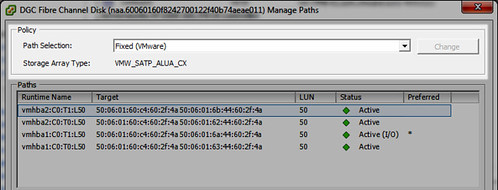
A better solution would be to modify the default PSP for your SATP (Storage Array Type Plugin) so that each new LUN presented to the hosts is automatically configured for Round Robin.
Taking a look at the default PSP for each SATP, I see there is a mix of two different PSPs: VMW_PSP_FIXED (generally for active/active arrays) and VMW_PSP_MRU (generally for active/passive arrays). Notice the Round Robin policy VMW_PSP_RR is not the default for any SATP:
[root@lando /]# esxcli storage nmp satp list
Name Default PSP Description
——————- ————- ——————————————————-
VMW_SATP_ALUA_CX VMW_PSP_FIXED Supports EMC CX that use the ALUA protocol
VMW_SATP_ALUA VMW_PSP_MRU Supports non-specific arrays that use the ALUA protocol
VMW_SATP_MSA VMW_PSP_MRU Placeholder (plugin not loaded)
VMW_SATP_DEFAULT_AP VMW_PSP_MRU Placeholder (plugin not loaded)
VMW_SATP_SVC VMW_PSP_FIXED Placeholder (plugin not loaded)
VMW_SATP_EQL VMW_PSP_FIXED Placeholder (plugin not loaded)
VMW_SATP_INV VMW_PSP_FIXED Placeholder (plugin not loaded)
VMW_SATP_EVA VMW_PSP_FIXED Placeholder (plugin not loaded)
VMW_SATP_SYMM VMW_PSP_FIXED Placeholder (plugin not loaded)
VMW_SATP_CX VMW_PSP_MRU Placeholder (plugin not loaded)
VMW_SATP_LSI VMW_PSP_MRU Placeholder (plugin not loaded)
VMW_SATP_DEFAULT_AA VMW_PSP_FIXED Supports non-specific active/active arrays
VMW_SATP_LOCAL VMW_PSP_FIXED Supports direct attached devices
Modifying the PSP is achieved with a single command on each ESXi host (no reboot required):
[root@lando /]# esxcli storage nmp satp set -s VMW_SATP_ALUA_CX -P VMW_PSP_RR
Default PSP for VMW_SATP_ALUA_CX is now VMW_PSP_RR
Similarly and specifically for Dell Compellent Storage Center arrays, modifying the PSP is achieved with a single command on each ESXi host (no reboot required):
Storage Center 6.5 and older esxcli method:
[root@lando /]# esxcli storage nmp satp set -s VMW_SATP_DEFAULT_AA -P VMW_PSP_RR
Default PSP for VMW_SATP_DEFAULT_AA is now VMW_PSP_RR
Storage Center 6.6 and newer esxcli method:
[root@lando /]# esxcli storage nmp satp set -s VMW_SATP_ALUA -P VMW_PSP_RR
Default PSP for VMW_SATP_ALUA is now VMW_PSP_RR
Storage Center 6.5 and older PowerShell method:
$Datacenter = Get-Datacenter -Name “Datacenter”
ForEach ( $VMHost in ( Get-VMHost -Location $Datacenter | Sort-Object Name ) )
{
Write-Host “Working on host `”$($VMHost.Name)`”” -ForegroundColor Green
$EsxCli = Get-EsxCli -VMHost $VMHost
$EsxCli.storage.nmp.satp.list() | Where-Object { $_.Name -eq “VMW_SATP_DEFAULT_AA” }
$EsxCli.storage.nmp.satp.set( $null, “VMW_PSP_RR”, “VMW_SATP_DEFAULT_AA” )
$EsxCli.storage.nmp.satp.list() | Where-Object { $_.Name -eq “VMW_SATP_DEFAULT_AA” }
}
Storage Center 6.6 and newer PowerShell method:
$Datacenter = Get-Datacenter -Name “Datacenter”
ForEach ( $VMHost in ( Get-VMHost -Location $Datacenter | Sort-Object Name ) )
{
Write-Host “Working on host `”$($VMHost.Name)`”” -ForegroundColor Green
$EsxCli = Get-EsxCli -VMHost $VMHost
$EsxCli.storage.nmp.satp.list() | Where-Object { $_.Name -eq “VMW_SATP_ALUA” }
$EsxCli.storage.nmp.satp.set( $null, “VMW_PSP_RR”, “VMW_SATP_ALUA” )
$EsxCli.storage.nmp.satp.list() | Where-Object { $_.Name -eq “VMW_SATP_ALUA” }
}
If I take a look at the the default PSP for each SATP, I can see the top one has changed from VMW_PSP_FIXED to VMW_PSP_RR:
[root@lando /]# esxcli storage nmp satp list
Name Default PSP Description
——————- ————- ——————————————————-
VMW_SATP_ALUA_CX VMW_PSP_RR Supports EMC CX that use the ALUA protocol
VMW_SATP_ALUA VMW_PSP_RR Supports non-specific arrays that use the ALUA protocol
VMW_SATP_CX VMW_PSP_MRU Supports EMC CX that do not use the ALUA protocol
VMW_SATP_MSA VMW_PSP_MRU Placeholder (plugin not loaded)
VMW_SATP_DEFAULT_AP VMW_PSP_MRU Placeholder (plugin not loaded)
VMW_SATP_SVC VMW_PSP_FIXED Placeholder (plugin not loaded)
VMW_SATP_EQL VMW_PSP_FIXED Placeholder (plugin not loaded)
VMW_SATP_INV VMW_PSP_FIXED Placeholder (plugin not loaded)
VMW_SATP_EVA VMW_PSP_FIXED Placeholder (plugin not loaded)
VMW_SATP_SYMM VMW_PSP_FIXED Placeholder (plugin not loaded)
VMW_SATP_LSI VMW_PSP_MRU Placeholder (plugin not loaded)
VMW_SATP_DEFAULT_AA VMW_PSP_RR Supports non-specific active/active arrays
VMW_SATP_LOCAL VMW_PSP_FIXED Supports direct attached devices
Now when I present a new LUN to the host which uses the VMW_SATP_ALUA_CX SATP, instead of using the old PSP default of VMW_PSP_FIXED, it applies the new default PSP which is VMW_PSP_RR (Round Robin):
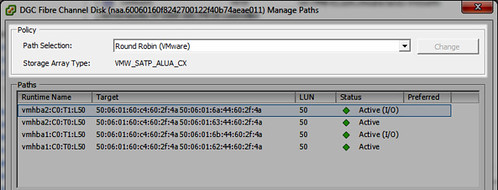
To clarify just a little further, what I’ve done is change the default PSP for just one SATP. If I had other active/active or ALUA arrays which used a different SATP, I’d need to modify the default PSP for those corresponding SATPs as well.
This is good VCAP-DCA fodder. For more on this, take a look at the vSphere Storage Guide.
If you’ve already presented and formatted your LUNs to your vSphere cluster, it’s too late to use the above method to automagically configure each of the block devices with the Round Robin PSP. If that is the case you find yourself in with a lot of datastores you’d like to reconfigure for Round Robin, PowerShell can be leveraged with the example below changing the PSP to Round Robin explicitly for Dell Compellent Storage Center volumes (this script comes by way of the Dell Compellent Best Practices Guide for VMware vSphere):
Storage Center 6.5 and older PowerShell method:
Get-Cluster InsertClusterNameHere | Get-VMHost | Get-ScsiLun | where {$_.Vendor -eq “COMPELNT” –and $_.Multipathpolicy -eq “Fixed”} | Set-ScsiLun -Multipathpolicy RoundRobin
Storage Center 6.6 and newer PowerShell method:
Get-Cluster InsertClusterNameHere | Get-VMHost | Get-ScsiLun | where {$_.Vendor -eq “COMPELNT” –and $_.Multipathpolicy -eq “MostRecentlyUsed”} | Set-ScsiLun -Multipathpolicy RoundRobin
The PSP for devices which are already presented and in use by vSphere can also be modified individually per host, per device using esxcli. First, retrieve a list of all devices and their associated SATP and PSP configuration via esxcli on the host:
[root@lando:~] esxcli storage nmp device list
naa.6000d31000ed1f010000000000000015
Device Display Name: COMPELNT Fibre Channel Disk (naa.6000d31000ed1f010000000000000015)
Storage Array Type: VMW_SATP_ALUA
Storage Array Type Device Config: {implicit_support=on;explicit_support=off; explicit_allow=on;alua_followover=on; action_OnRetryErrors=off; {TPG_id=61485,TPG_state=AO}{TPG_id=61486,TPG_state=AO}{TPG_id=61483,TPG_state=AO}{TPG_id=61484,TPG_state=AO}}
Path Selection Policy: VMW_PSP_MRU
Path Selection Policy Device Config: Current Path=vmhba1:C0:T10:L256
Path Selection Policy Device Custom Config:
Working Paths: vmhba1:C0:T10:L256
Is USB: false
Now change the PSP for the individual device:
[root@lando:~] esxcli storage nmp device set -d naa.6000d31000ed1f010000000000000015 -P VMW_PSP_RR
Perform this action for each device on each host in the cluster as needed.
Round Robin specific tuning can be made per device per host using the esxcli storage nmp psp roundrobin deviceconfig set command. Type may be default, iops, or bytes. The Round Robin default is 1000 IOPS. Default bytes is 10485760 or 10MB. Following is an example changing the Round Robin policy for the device to IOPS and 3 IOPS per path:
[root@lando:~] esxcli storage nmp psp roundrobin deviceconfig set -d naa.6000d31000ed1f010000000000000015 -t=iops -I=3












I’d imagine that would be good when you have a specific vendor SATP like you have with vmw_satp_alua_cx and you want to enforce the vendor recommended PSP of RR.
NetApp for instance don’t as yet have a vendor SATP and will use the VMware default of vmw_satp_alua and I guess i’d be wary of changing the default VMware setting, even though NetApp best practise is to use the RR PSP. Their preferred method is to use the Virtual Storage Console to configure settings.
I can think of case such as MSCS where you wouldn’t want to do this but it does offer you flexibility in your own environment.
Thanks for the comment Greg. You are right about accounting for any and all arrays that are detected, especially if they happen to use the same SATP. Other claim rules can be defined which handle a heterogeneous environment. This is more about laying a foundational framework of knowledge. It’s a demonstration of a single array type and it showcases just one example of modifying the PSA components. It does go a lot deeper and of course all considerations should be on the table when tuning storage in any size environment.
This script changes it per cluster(bases on 4.1 powercli)
$vcserver = ‘vcenter’
$cluster = ‘Cluster’
$psp = “VMW_PSP_RR”
$satp = “VMW_SATP_DEFAULT_AA”
$esxCred = Get-Credential
Connect-VIServer $vcserver
$arrhosts = get-vmhost -location (get-cluster $cluster)
Foreach ($h in $arrhosts){
$hostView = get-view $h.id
$policy = new-object VMware.Vim.HostMultipathInfoLogicalUnitPolicy
$policy.policy = “rr”
$storageSystem = get-view $hostView.ConfigManager.StorageSystem
$storageSystem.StorageDeviceInfo.MultipathInfo.lun | where { $_.Path.length -gt 1 } |foreach { $storageSystem.SetMultipathLunPolicy($_.ID, $policy) }
}
Foreach ($h in $arrhosts) {
Connect-VIServer $h -Credential $esxCred | Out-Null
}
Foreach($esxcli in Get-EsxCli) {
#Change the default PSP for our SATP
$esxcli.nmp.satp.setdefaultpsp($psp,$satp) #| Out-Null
}
Foreach ($esx in Get-Cluster $cluster | Get-VMHost) {
Disconnect-VIServer $esx.name -Confirm:$false
}
Disconnect-VIServer * -Confirm:$false | Out-Null
This is very good information.Thanks
Great example, but for CLARiiON storage, you definitely do NOT want to select Round Robin. For best overall performance, you should have it set to Fixed in 5.0 (which used to be called Fixed_AP in v4.1).
@Jim Burd: That’s news to me.
For best overall performance, EMC would like you to purchase PowerPath/VE 🙂 Have a great weekend.
Well, with PowerCLI can get you the job in minutes..
Get-VMHost | Get-SCSILUNs -LunType “Disk” | where {_.MultipathPolicy -notlike “RoundRobin”} | Set-SCSILUN -MultipathPolicy RoundRobin